
Phoropter Anatomy for Optometry Students


The phoropter is an instrument used in optometry. It is used to measure the patient’s vision and perform a subjective refraction, in order to assess visual correction, verify a prescription, or support a diagnosis.
For students, understanding the anatomy of the phoropter is essential in order to master all settings and be able to test a patient’s vision within a limited time.
In this practical study sheet, discover the main components of the manual phoropter and their purpose.
Sphere Power Dials
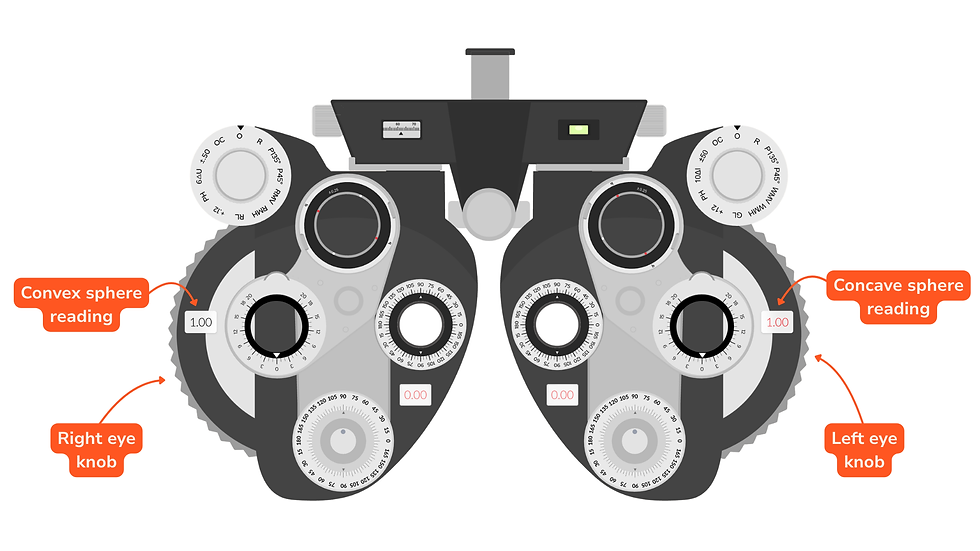
The sphere power dials allow the practitioner to add or remove spherical power in front of each eye, expressed in diopters.
They are used to correct:
myopia with negative values (-) corresponding to diverging lenses
hyperopia with positive values (+) corresponding to converging lenses
Each eye has its own dial: one for the right eye and one for the left eye.
How to use the sphere power dials
The optometrist or student turns the dial upward or downward to gradually change the prescription until the best possible visual clarity is achieved.
They are mainly used to:
Cylinder Power Dials

The cylinder power dials allow the practitioner to add or modify cylindrical power in front of each eye, expressed in diopters.
They are used to correct astigmatism.
Each eye has its own dial: one for the right eye and one for the left eye.
How to use the cylinder power dials
The optometrist or student gradually adjusts the cylindrical power by turning the dial in order to improve visual clarity.
The cylinder power always works in combination with an axis, which determines the orientation of the astigmatism correction.
The cylinder power dials are mainly used to:
increase or decrease cylindrical power
refine visual clarity
complete the subjective refraction
Cylinder Axis Dials

The cylinder axis dials allow the practitioner to orient the cylindrical correction between 0° and 180° in front of each eye.
They are used when correcting astigmatism, as the cylinder must be placed at a precise orientation to provide clear vision.
Each eye has its own axis control: one for the right eye and one for the left eye.
How to use the cylinder axis dials
The optometrist or student gradually turns the dials to find the orientation that provides the best visual clarity for the patient.
The axis is always adjusted in relation to the cylinder power. Both settings work together.
The cylinder axis dials are mainly used to:
orient the astigmatism correction
refine a subjective refraction
finalize the cylindrical prescription
The JCC (Jackson Cross Cylinder)

The JCC (also called Jackson Cross Cylinder) is a built-in accessory of the manual phoropter used to refine the correction of astigmatism.
It allows the practitioner to quickly compare two lens positions in order to determine which one provides the best visual clarity for the patient.
What is the JCC used for?
The JCC is mainly used to:
check or refine the cylinder axis
check or refine the cylinder power
Auxiliary Lens Dials

The auxiliary lens dials allow the practitioner to quickly insert different filters, lenses, and accessories in front of the patient’s eyes during the eye exam.

Depending on the manual phoropter model, they provide access to several built-in tools:
“O” : Open position.
“OC” : Occluded (closed). Used to cover one eye during monocular testing.
“±.50” : Astigmatic lens.
“6△U” : 6△ Base Up prism. Used for certain tests.
“10△I” : 10△ Base In prism. Used for certain tests.
“PH” : Pinhole.
“+.12” : +0,12 δ convex sphere.
“RL” : Red lens.
“GL” : Green lens.
“RMH” : Horizontal Maddox rod. Used to measure horizontal phorias.
“RMV” : Vertical Maddox rod. Used to measure vertical phorias.
“P45°” et “P135°” ou “P” : Polarizers at 45° and 135°.
“R” : +1,50 δ convex sphere.
How to use the auxiliary lens dials
The optometrist or student turns the dial until the desired accessory is selected. It is then positioned in front of the corresponding eye.
Distance / Near Vision Selector (DV / NV)

The DV / NV selector allows the practitioner to quickly switch between distance vision (DV) and near vision (NV) during the eye exam.
What is this setting used for?
It allows the examination to be adapted according to the working distance:
DV (Distance Vision): used for distance refraction, distance visual acuity, and most standard tests.
NV (Near Vision): used for reading, presbyopia assessment, near addition, and certain near binocular vision tests.
How to use the DV / NV selector
The optometrist or student operates the lever on the phoropter to switch from distance mode to near mode.
Pupillary Distance Adjustment

The pupillary distance adjustment allows the position of the two phoropter eyepieces to be adapted to the distance between the patient’s pupils.
This alignment is essential so that each eye looks properly through the optical center of the lenses.
How to use the pupillary distance adjustment
The optometrist or student moves the two sides of the phoropter closer together or farther apart until the eyepieces are correctly centered in front of each eye.
The adjustment is independent for the right eye and left eye.
Once positioned correctly, the patient should see comfortably without double vision or discomfort.
Prism Dials
The prism dials allow the practitioner to introduce a prism effect in front of the patient’s eyes during the eye exam.
They are mainly used in binocular vision to assess eye alignment, measure certain ocular deviations, and perform various fusion tests.
Prisms are present on both eyes.
What are the prism dials used for?
They are mainly used to:
measure horizontal and vertical phorias
break fusion
perform binocular balance testing
How to use the prism dials
The optometrist or student turns the dial to gradually increase the prism value, expressed in prism diopters (△).
The prism can be oriented in different base directions:
Base In (BI)
Base Out (BO)
Base Up (BU)
Base Down (BD)
The orientation depends on the test being performed.

Conclusion
Mastering the anatomy of the manual phoropter is essential for any student or professional in optometry. Understanding the different dials, accessories, and settings helps improve speed, accuracy, and comfort during an eye exam.
Whether adjusting sphere power, correcting astigmatism, using the JCC, setting the pupillary distance, or applying prism, each component of the phoropter has a specific role that is important to understand and master.


